This tip of the iceberg post introduces the primary principles that govern user interface design.

Some background on the terms and disciplines in the field of human-computer interaction.
User Experience
The experience the user has when interacting with a company, its products or services.
For example the experience a user has using a kettle, the experience a user has using the services of a bank.
Usability
How easy it is to use a User Interface, usually determined by considering: Learnability; Efficiency for both new and experienced users; Memorability; Frequency of errors; and User satisfaction.
User Experience Design
The process of improving customer satisfaction and loyalty by improving the usability and pleasure provided in the interaction with a company, its products or services.
User Interface Design
Using graphics design principles to design the user interface of machines and software, focusing on usability and maximizing good user experience. The goal is the simplest, most efficient interaction possible, irrespective of the users experience and skill level. When designing the user interface of software for a graphical operating system, user interface design is called graphics user interface design.
Human-Computer Interaction
The study of how humans interact with computers, to develop new and improved ways of doing so. This field of research is situated at the intersection of computer science, behavioural science, design, media studies and more.

Consistency
Consistency is the most important attribute of the user interface and the code that implements it. Consistency improves learnability and usability. In a consistent design, things look and work the same, allowing knowledge to be transferred to different contexts, and enables recognition over recall. Consistency is when things that look the same work the same; and things that work the same look the same. This is visual and functional consistency. External consistency is when consistency is applied to all the company’s products and services. External consistency improves the user experience.
External consistency is achieved by having a single design language that specifies:
- Grid system
- Margin and padding
- Colour palette
- Language and tone
- Familiar design patterns
Visual Hierarchy
Visual hierarchy is a hierarchy of perceived importance of content. The hierarchy is established using colour, contrast, typography, spacing and other graphic design principles. The visual hierarchy determines the order in which the human eye will perceive what it sees. This can be used to improve the usability of the software.
Visual hierarchy is established by creating focal points of difference prominence. The following can be used to emphasize and de-emphasize content.
- Size
- Colour
- Typography
- Spacing
- Texture
When the content does not have a strong visual hierarchy, the human visual system has a preference for how the content is scanned. The more popular patterns to describe this are the Gutenberg diagram, the F pattern, and the Z pattern.
Use composition to organize and structure the content. The following can be applied:
- Rule of thirds
- Rule of odds
- Implied movement
Neilson’s Usability Heuristics
Jakob Nielson identified 10 heuristics that can be applied to user interfaces to improve usability.
- The user is kept informed about what is going on by providing visibility of system status within a reasonable time.
- The system should solve the problem within the context of the problem domain by ensuring there is a match between the system and the real world.
- The user should be in control and have the freedom to try things in the knowledge they can easily and safely back out.
- The user interface should be consistent and adhere to standards and platform guidance.
- Design to ensure error prevention rather than error reporting.
- Design for flexibility and efficiency of use, irrespective of the experience and skill level of the user.
- Focus on aesthetics and minimalist design to allow the user to achieve the most by doing the least.
- Help the user understand errors and how to correct them by helping the user recognize, diagnose, and recover from errors.
- Provide outcomes based help and documentation to guide the user.
Gestalt principles
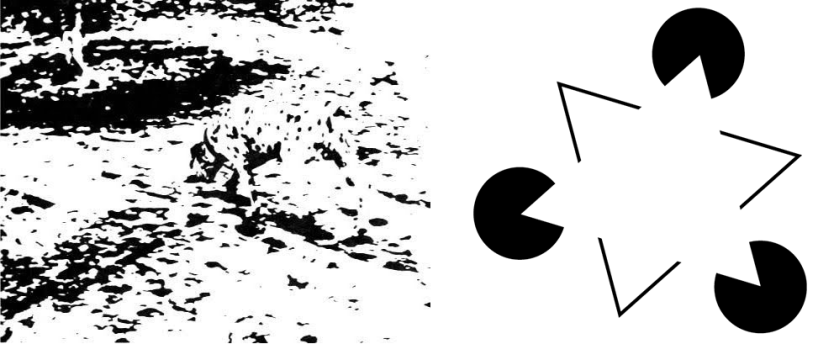
Principles that describe the human vision processing system. The brain prefers to interpret a scene as a whole, over a simple construction from the individual elements (perceived as more than the sum of its parts).
Proximity
Items that are close together are perceived as related.

Use proximity to create a visual hierarchy by grouping related content and separating unrelated content.
Similarity
Items that are similar are perceived as being related.

Used to enhance consistency; things that look the same work the same and things that work the same look the same.
Closure
Separate items can be perceived as a single item.


Icons often rely on closure. Used to related groups of content and guide the user through the visual hierarchy. This can, however, be intended and unintended.
Symmetry
Symmetric items are perceived to be one, or related.

Used to create balance and harmony in the presentation of the content. Breaking the symmetry can be used to create a focal point and establish the visual hierarchy.
Continuation
Broken items are perceived as being one; individual items arranged along gentle curves are perceived as being related.


Used to guide the user through content by implying direction and movement.
Common Fate
Items that move similarly or in the same direction are perceived as being related.
Used to create transition animations. Helps the user interpret the change in context by showing how the new relates to the old. Vibrations used to create groups.
Bias
Interpretation is affected by culture, past history, context, knowledge, understanding, beliefs etc. Designs should be resilient to bias. Subtle designs more susceptible to bias than bold ones.
The interpretation of language, tone, and colour are most affected by culture.

“Don’t make me think, don’t make me work, don’t spend my time. It is about me the user and not you the designer.”
To produce a good design the designer should put themselves in the shoes of the user. Understand their needs and the goals they are trying to achieve.
Need: Require something because it is essential or very important rather than just desirable.
Goal: The object of a person’s ambition or effort.
The design should also be respectful of the user and should ensure that in meeting the user’s goal:
- The user’s effort is minimised
- The user’s time is minimised
- Focus remains on the goal
Some of the ways this can be achieved is:
- Minimise the number of screens and input required
- Minimise the human-computer interaction
- Minimise context changes
- Minimise the number of components used to craft the user interface
References
http://asktog.com/atc/principles-of-interaction-design
https://docs.microsoft.com/en-us/previous-versions/ms997506(v=msdn.10)
 keithcrompton.com